
From our sponsor: Leverage AI for dynamic, custom website builds with ease.
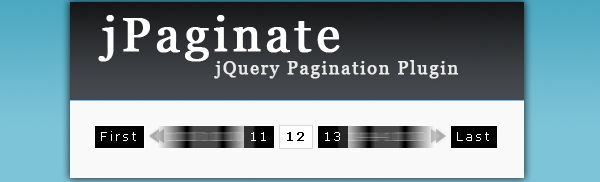
jPaginate is a jQuery pagination plugin that comes with a twist: animated page numbers. The user can slide through the available page numbers by clicking or just hovering over the arrows. Shortlinks to the first and last page are available as well.
You can call the plugin in the following way:
$(elementID).paginate()
You can configure the plugin with the following properties:
- count: The total number of pages
- start: With which number the visible pages should start
- display: How many page numbers should be visible
- border: If there should be a border (true/false)
- border_color: Color of the border
- text_color: Color of the text/numbers
- background_color: Background color
- border_hover_color: Border color when hovering
- text_hover_color: Text color when hovering
- background_hover_color: Background color when hovering
- images: If the arrows should be images or not (true/false)
- mouse: With value “press” the user can keep the mouse button pressed and the page numbers will keep on sliding. With value “slide” the page numbers will slide once with each click.
- onChange: The callback function when clicking on a page. As argument the number of the page clicked can be used.
Message from TestkingLearn the basics of jquery using sun tutorials. Download SY0-201 dumps to learn how to create jQuery plugins and pass your ccnp exams on first attempt.




@TED S it’s possible to recreate the pagination on the same HTML element if the number of pages change, i did that already. I check if the new “count” from AJAX is different than the one used to create the pagination and if so, i recreate it the same way i created it but with the new values coming from AJAX.
@Cody thanks for the great piece of code here. I made modifications to your script to add 4 new options :
page_choice_display : false,
item_count_display : true,
item_count : 10,
item_count_total : 0
This adds 2 things :
– a way to manually set the page # you want to access
– a way to manually specify the number of items you want to display by page (and optionally displaying the total number of items). Usefull for AJAX calls.
I also integrated Aleksandar’s modifications so a click on First or Last or on the actual selected page won’t do any action.
I couldn’t find a way to reach you on the website so i don’t know how to give you the code i made. Would you use something like Github ?
Anyway i modified the demos to show what i added here : http://jeremy.huet.free.fr/jPaginate/jPaginate.html
Thanks.
The position of page links is fixed as a result of which the content overlaps the page links if the content height exceeds the original height of the content div.
Please advise on how to make the position of the page links dynamic and relative to the position of content bottom.
Sorry, the above comment is incorrectly given.
Actual query is that I want to link the pagination and the content displayed to the database using ASP/ VBScript.
Please advise.
This is nice. Can someone tell me what the license is? MIT?
Thanks,
Adam
just want to ask it’s that possible to add any images inside the pagination box
thx 🙂
@Cody I finally decided to put my modifications of your plugin on my GitHub for an easier maintenance and shareability. If it’s a problem for you just tell me.
The code can be find here : https://github.com/jhuet/jPaginate-fork
And the demo here : http://jhuet.github.com/jPaginate-fork/
I may also give examples there on how to use it with AJAX queries as many people have been asking for it.
I really need help! I need to finish a project and this pagination is perfect for it, but I need to know what to put in OnChange in order to call a simple html page. Pleaseeee help!
Jérémy,
I´m using your fork.
This line need change for translation facility.
.append($(”).addClass(‘jPag-pageChoice-label’).html(‘Page #’))
Good pagination but not functional. we can adapt it to a SQL query
we can’t adapt
I was searching jquery pagination for almost a month to use in my project but couldn’t get one as per my linking so i had to use one built in the framework. Now i think i will be using this in every project. You solved my one problem at least. Thanks a lot!!!
Hey guys!
I noticed no one had posted a fix for the page numbers not showing in 3 or less pages in IE.
Well I figured it out!!!
Line 106. Change the line to:
if(bName == ‘Microsoft Internet Explorer’){
This worked for me!!!
also the above fix will take care of the last button wrapping in all browsers.
Hi is there any way to show the same pagination both at top and bottom of the page…
How can I enable transitions to the content that is being loaded with every page click? Lets say, as the first page moves out, the second page slides in. Would be good to have the transitions enabled for this plugin.
Where is Cody??
People still want to know how to get 2 instances working on one page that update together.
Can someone, anyone please post an in depth description of how to do this. I’ve seen a few posts of people solving this put they never post the full answer.
Please help!
Thanks
Is it possible to know which elements are being displayed? (Not looking for the selected element)