
From our sponsor: Leverage AI for dynamic, custom website builds with ease.
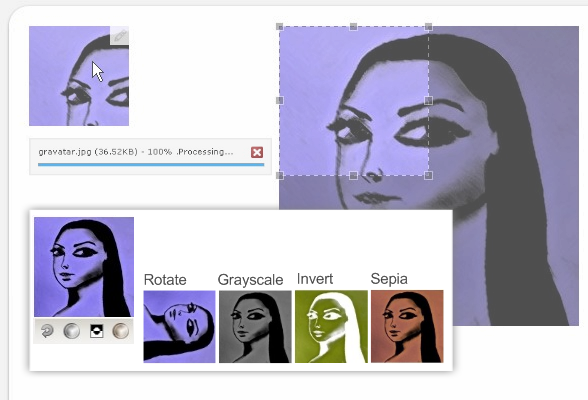
Here’s an updated version of the Image Cropper. The upload button was replaced by an overlay on the image. There are also some extra functionalities :
- invert the picture colors
- rotate the image
- sepia
- transforms an image into greyscale





Pingback: jQuery Image Cropper with Uploader | Codrops
Pingback: uberVU - social comments
Pingback: jQuery Image Cropper — recadrer et uploader des images » Javascript & Web Design - Tous les jours le meilleur des ressources Javascript pour intégrateurs web front-end (avec parfois un soupçon de PHP)
HI! Thanks for combining two great jquery scripts.. I was wondering, do you know if this will work well with WordPress?
Hi, I think that there is a problem in the archive, because, when i install the script, i see the same page as the demo, i can choose a file, but it’s stop at processing.
Can you help me ?
Thanks
Hi Marc, I have just downloaded the file and installed again (xampp) and it seems to work fine. What size of picture are you trying to upload? Just try some small one first… You can then configure that value in the script.
Regards
it’s the same for me, i’ve just download and extract it, and when i tried to upload, it’s stop at processing.
I tried with different pictures and it’s always the same. (I tried with a 45kb picture… the script default value is 800kb, and yes, when i tried a 2mb file, i have a size error, so the problem is not the size…).
I’ve looked the script but I didn’t seen what can be the problem…
Any other ideas ?
Thanks
Hi martino, I have just tested it again in 2 computers – download, extract to htdocs (I am using xampp) and it works fine. Where are you deploying this script?
first i’ve tried with easyphp, then with wamp server, and it’s stop at processing, and i’ve just download and tried with xampp and it’s work…
I’ve also tried online (1&1 account) and its stop again at processing…
so now i try to find why its only work well with xampp. If I found I will share the solution here, but any ideas are welcome
If you have trouble running the script, it has the function ereg no longer available for some version of php, which is used in the script upload.class.php.
The latest version of this script is available here:
http://www.verot.net/php_class_upload.htm
The problem … is that the upload script has been changed in this plugin …
Solution: look for lines that takes problems, and replace the same in the latest version of the script upload.class.php.
Good luck!
I have the same problem, it’s block at processing,i try to remplace the class.upload.php but it doesn’t work, please help me
You can see in the current upload class, some lines added (search the word ‘updated’ in comments).
You need to copy these lines in the last release of upload class.
Square only? No rectangle when it comes to area selection on the picture?
I’m having the same problem, i dont understand the solution nadiar gave
ok i got it to work i replaced the ereg with preg_match. however, should it replace the image for each upload? or does it give each image a unique name?
Download the latest class.upload.php from this link: http://www.phpclasses.org/browse/file/8831.html and replace this file in the root of this installation. I got it working. This file is an updated version of the file included in the download above.
http://www.filefun.net/use/cropimage/
i put the class.upload.php , don’t work
Hello,
that’s exactly what I wanted.
Just one question, how to make the thumbnail and preview make 450 x 120px ?
thank you
Doesn’t work for me neither. I downloaded the latest upload class, nothing changed.
I can upload and crop the image, but when I hit the save button, the image is gone and I’m back to the index page. The image is nowhere to be found in the folders.
I’m using wampserver.
Anyway thanks for the great script.
Ok I got it working. The problem was:
$_SERVER[‘DOCUMENT_ROOT’]
My script runs on:
http://localhost/test/crop1.1/
Instead of putting the images in:
http://localhost/test/crop1.1/
The script makes a new folder in:
http://localhost/
with the name crop1.1 and puts all the images there.
Is there anyway to change the:
$_SERVER[‘DOCUMENT_ROOT’]?
I tried multiple times to change it to my directory but the script won’t work anymore.
Thanks in advance.
@Moonwalker:
You’re using the demo files, right?
Just replace the paths in line 22 and 38 in crop.php to get it right.
Hope that helps!
Hi !
Thanks for this great script !
So I use a single upload but I’d like to send a new image without having to click on the cancel button and reload the entire page. How can i do that ? It’s possible ?
Thanks for your help.
I am looking to upload all type of files.. now even after I changed in index.php):
‘fileExt’ : ‘*.jpg’, to ‘fileExt’ : ‘*.jpg;*.gif;*.png;*.bmp’, ; I could just upload the files but not save them.. please guide me..
HI.
Im localhost , no problems.
But in sub-directory`s, im have problemas .
Download de class in link:
http://www.phpclasses.org/browse/file/8831.html
And Replace:
change.php(line 6 , 32 , 43)
$_SERVER[DOCUMENT_ROOT] = getcwd();
crop.php(line 24 and 40).
: )
Thanks.
Im from brazilian.
Dimitri Vargas Figueiredo Guimaraes.
In the my steps, crop no functionate.
Open de new class.upload.php.
In the line `var $image_y`;
paste:
var $image_y;
//changed
var $jcrop;
var $rect_w;
var $rect_h;
var $posX;
var $posY;
In the line ` $this->image_y = 150`;
paste:
$this->image_y = 150;
//changed
$this->jcrop = false;
$this->rect_w = 100;
$this->rect_h = 100;
$this->posX = 0;
$this->posY = 0;
in the line ‘$res = imagecopyresampled($tmp, $image_src, 0, 0, 0, 0, $this->image_dst_x, $this->image_dst_y, $this->image_src_x, $this->image_src_y);’
paste:
if($this->jcrop){
//echo “JCROP IS TRUE!”;
$res = imagecopyresampled($tmp, $image_src, 0, 0, $this->posX, $this->posY, $this->image_x, $this->image_y, $this->rect_w, $this->rect_h);
}
else
$res = imagecopyresampled($tmp, $image_src, 0, 0, 0, 0, $this->image_dst_x, $this->image_dst_y, $this->image_src_x, $this->image_src_y);
// $res = imagecopyresampled($tmp, $image_src, 0, 0, 0, 0, $this->image_dst_x, $this->image_dst_y, $this->image_src_x, $this->image_src_y);
Thanks
Dimitri Vargas Figueiredo Guimaraes.
I noticed that this code crops images with an aspect ratio of 1:1. How do I customize this to crop to whatever ratio I want?
Hello!
I changed the paths of crop.php (lines 6, 22 and 38) and change.php (lines 6, 34 and 45) and doesn’t work.
It works perfectly in LOCALHOST but when I upload in my website, the upload be quite at 100%.
You can help me?
Thanks!
Hi i found this tool and the discussion very helpful.
My challenge is i cant find where the cropped images is supposed to be located after you click save.
Any help would be appreciated.
Hi,
original image will go here
crop1.1/photos/
cropped image will go here
crop1.1/photos/50
to test with a new image just delete the original ones in both folders
regards,
One reason this script is not working for some people is mime type handling for flash uploads. On my Apache, the mime type shows as application/octet-stream; charset=binary.
In the upload class, around line 2336, there is a block that starts with this comment // we need to work some magic if we upload via Flash
It is followed by an if statement. Add to the if statement,
|| $this->file_src_mime == ‘application/octet-stream; charset=binary’
That got the uploads working for me.
Is there any source to download this Image Cropper for asp.net?
I don’t understand the crop.php, upload.php and the files like these. Please help me 🙂 I really like this and i want to use it in my website.
Thanks a lot
Hi, very interesting code …
I’ve had more or less the same problems as the others
and indeed, changing the class.upload.php by the one there: http://www.phpclasses.org/browse/file/8831.html worked for me
Besides, changing the paths in crop.php (for “$handle = new Upload(…” and both “handle->Process(…” allowed me to put the images where I wanted…
I’m stuck with one last prob: the crop doesnt work. It saves the image in 100×100 but the entire image, not the protion I select…
any clue as to why ?
km
edit:
if you work on the class.upload.php donwloaded here: http://www.phpclasses.org/browse/file/8831.html ,
to cropt the image, change the code in crop.php from
$handle->rect_w = $_POST[‘w’];
$handle->rect_h = $_POST[‘h’];
$handle->posX = $_POST[‘x’];
$handle->posY = $_POST[‘y’];
to
$handle->image_crop = array(
$_POST[‘y’],
($handle->image_src_x-$_POST[‘x’]-$_POST[‘w’]),
($handle->image_src_y-$_POST[‘y’]-$_POST[‘h’]),
$_POST[‘x’]
);
it works for me 🙂
Hello,
I searched on the blog but couldn’ find. On which licence are the code in the tutorials?
Can we use your code in commercial projects?
Thanks 🙂
Hello can anybody tell me what must i do .
everyone when upload a image is only one picture in destinaten call Picture.jpg
what must i change for upload image
ohh man what is that .
when i take the crop folder i a subfolder the thumbs are not save
can anyone give me the current code i have the demo files .
where is the docu of this
please help me
Hi, how can we use this script with more than 1 images?
Hi everyone!
This is a really interresting script here.
But I was wondering if anyone succeded to change the ratio (I need to crop a rectangle)?
Hi, very interesting code …
I’ve had more or less the same problems as the others
and indeed, changing the class.upload.php by the one there: http://www.phpclasses.org/browse/file/8831.html worked for me
Besides, changing the paths in crop.php (for “$handle = new Upload(…” and both “handle->Process(…” allowed me to put the images where I wanted…
I’m stuck with one last prob: the crop doesnt work. It saves the image in 100×100 but the entire image, not the protion I select…
any clue as to why ?
km
I basically had the same problem as KALIMUKTI. I updated the class.upload.php file but the final cropped picture isn’t coming out right
@OVERFLO: yes i did. you need to change a few things. first the preview div css:
.preview_container{
width:122px;
height:168px;
then in uploadify
‘width’ : ‘122’,
‘height’ : ‘168’,
in jcrop part of code
aspectRatio: 122 / 168,
in function showPreview
var rx = 122 / coords.w;
var ry = 168 / coords.h;
and right below that function
$imgpos = {
width : ‘122’,
height : ‘168’
in crop.php
$handle->image_x = 122; //size of final picture
$handle->image_y = 168; //size of final picture
and you’re done:)
anyone else having a problem that on localhost everything works fine but when you put it on a server after image uploads crop window doesn’t appear? the temp file is uploaded in right place, i checked… i have newest class_upload.php and it’s tested on localhost (xampp)