PHP Login System Reloaded v1.1

Development September 16, 2009 by chadking 219 Comments


PHP Login System

Here’s an updated version of the PHP Login System. You can check the old version here.

The following was added:

1. Registration fields:

  • email confirmation
  • password confirmation
  • country
  • recaptcha

Email confirmation and password confirmation are configurable fields. By default they are shown, but if you wish to remove one or both of them you have to set it in the file constants.php:

define("REPEAT_EMAIL",true);
define("REPEAT_PASSWORD",true);

2. Table fields:

  • the user ip,
  • number of logins of a user,
  • flag is_admin
  • flag is_blocked
  • new table – Country table

3. dbcontroller class sanitizes user input data

4. Edit Account Area

5. Admin Area – incomplete (for next version)

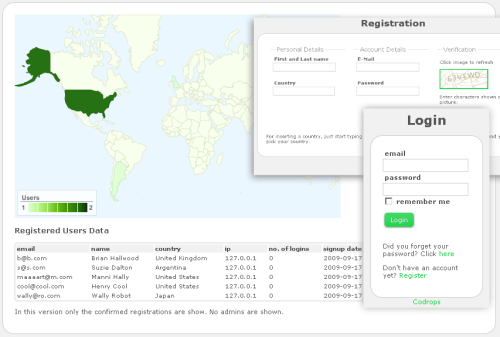
For now just the list of users is shown and a world map indicating where the users come from.  You can delete Users and set them as Admins. If there are no users to list, no map is shown. Also the User seeing the panel is not shown.
Note that in the demo you will not be able to see the admin part – for admin reasons :)

6. New CSS

7. Some other small details in the php code.

For the next version I am planning to :

  • add all admin functions
  • improve and improve ….

To use the recaptcha you need to get a public/private key here . Then you need to define them in constants.php:

define("PUBLICKEY","XXXXXXXXXXXXXXXXXXXXXXXXXXXXXX");
define("PRIVATEKEY","XXXXXXXXXXXXXXXXXXXXXXXXXXXXXX");

In order to use the demo for those who have registered in the previous version’s demo, you need to register again (in the demo login system), since I had to set up another database for it.

Hope you like it. Any suggestions or improvements are welcome!

DEMO

Download the source code here


Tagged with: , , , ,

Discussion219 Join the discussion

  • GABRIELLA

    Chad hi again.

    the demo here shows very good improvements to the system, i love it. though i was unable to see the number of users logged in at the moment.

    How about in the next version you av something like a homepage where after a user been logged in, has a place to begin from. and a user profile, forum and how you can deny a logged in user access to other pages. for example we can demonstrate this by admin where they cant login unless is admin.

    thanks and keep up the good work.

  • Josh

    Great, Thanks, hope to try it out when I need a login. Cheers : )

  • James Willson

    Awesome work! Thank you for releasing an updated version, ive just installed it and it seems to be working perfectly.

  • Will74

    love it! this is such a huge improvement on the old script.

    something that might be good is give the user 5 oppertunities to register / login successfully and then block their IP for 15 mins. this is to stop spam bot registrations trying to brute force the capcha.

    thanks again for an awesome script

  • John

    HI,

    I do not know why, but the capcha do not want to work on my site.

    Could it be because of the PHP version?
    http://www.ajits.net/login/public_html/

    Thanks for the help.

    John

  • chadking

    Hi,
    which php version do you have?
    Is that the link where you have deployed the script? I dont see the login page…
    Maybe if you could have it there, I could take a look..!?
    greetings

  • chadking

    ok I see,
    you mean http://www.ajits.net/loginsystem/public_html/

    As far as I see you have another problem in the main index (public_index.php), this is because you have “<?" instead of "<?php" somewhere in that file. Some engines suport both others not. I thought I corrected that but I must have missed one! If you download the updated version you will have that fixed already (I hope).

    For the captcha image, can you try to rename the file image.jpg (under images/captcha/) to image.php ?

    Please let me know if it worked.

    greetings

  • John

    Sorry this is the correct link:
    http://www.ajits.net/loginsystem1_1/register/

  • JohnH

    Fantastic script :) i DL this because my PHP mysql ability is nowhere near this, i do have an issue with the registration link….

    i get this:

    Parse error: parse error in C:\wamp\www\login2\register\index.php on line 104

    any ideas?

    Sorry about this, i figure the best way to fix is to ask :)

  • chadking

    Hi,
    thats a “}” in that line right?
    I saw that I forgot again in line 28 of that same file to replace “<?" for "<?php". Maybe that can be the problem!? pls let me know!
    greetings

  • JohnH

    That was correct, thank you :)

  • John

    Thanks for the excellent script!! :)

    The change of image.jpg to image.php worked just file.

    Thanks!

  • JohnH

    On a specific note, im trying to create a website fo rmy local aikido club, any way you can advise me to add a few details onto the personal info page?

  • ghozt

    Please help.
    Which file do i set the username, password and database?

  • ghozt

    dont worry, i fixed it all up

  • ghozt

    great system btw, awesome.
    Cheers

  • ghozt

    how long till u release the next version???? im awaiting it eagerly …

  • chadking

    Hi.
    I will release an update this week!
    greetings

  • QnAsker

    Chadking greetings.

    i was wondering if we could have 2 levels of administrators. where one (level 9) is the owner of the site who can manage other administrators and the other users while the other (level 7) is only able to manage the registered users (level 1) or guests. can we also create users profiles with fotos loaded?

    simply helping you help me. greetings.

  • James

    Yes two levels of admin would be great, looking forwards to the update

  • James

    Also Id love the option for a normal memeber and then a “special” member. It would be fantastic to have an option to upgrade from a normal member to a special member with a paypal payment but I might be pushing my luck with that. :P

  • ghozt

    hi

    Cant wait till the update.

    BTW, how do u make certain pages secure, ie u have to be logged on in order to see them ???
    Can u help me ?

    Cheers

  • chadking

    Hi,
    the pages like edit account page are pages that you just can see if you are logged in. There’s always a check to see if the user is authenticated before the page is rendered. If he is not logged in then he is redirected to the main page.
    if($objCore->getSessionInfo()->isLoggedIn()){
    //html to render
    }
    else
    header("Location: public_html/index.php");

    greetings

  • ghozt

    Thank you.

    How do i change the style of the login box. I was trying to get a black background to fit in with my site?
    I went to the css style sheet, changed the background color for each part but it didnt seem to work, it just stayed the same?
    I’ve messed around with the style sheet but I just cant get anywhere?

    Thanks so much.

    Cheers

  • chadking

    Hi,
    You need to change the background-color of
    form.login , form.register, form.editaccount, .forgotpw, .adminpanel{
    position:relative;
    height:auto;
    margin:0 auto;
    border:1px solid #ccc;
    background-color:#fff;
    -moz-border-radius: 20px;
    -webkit-border-radius:20px;
    padding:20px;
    text-align: left;
    }

    greetings

  • ghozt

    Cheers.

    I tried it but it didnt work? i dont know wat im doing wrong?

    background-color:#000;

    ?????

  • chadking

    try to clean the browser’s cache. Does it work?

  • ghozt

    no it didnt.. =(

  • chadking

    ok, let’s check the following things:

    1. You didnt change the folder structure. The style.css is in the folder css.
    2. The public_index.php is in the root folder and has this line in the head:

    3. You didn’t change the class of the form (class=”login”)
    4. You cleaned your cache.

    Does any change to the style.css has effects?

    greetings

  • ghozt

    Hi

    I fixed it. Dreamweaver was not uploading properly to the testing server.

    Thanks so much.

    Cheers
    p.s cant

  • ghozt

    p.s cant wait for V 1.2

  • Matt

    Chad,

    I had the same problem John did where the captcha image wasn’t showing up. I also renamed it to image.php and it worked fine.

    I’d rather fix the real problem that use the workaround. Do know what the real issue is? I noticed that when I point my browser to image.jpg I get this error: “Permission denied (13) in ../images/captcha/image.jpg on line 3. Warning: session_start() [function.session-start]: Cannot send session cache limiter – headers already sent”

    Thanks for the great code and expert support!

    Matt

  • Chris

    Hey Chad,
    Thanks for this updated script. Really appreciate it. I have one *small* request though.

    Would you be able to provide a few more lines of code I can add so I can register session variables (like putting the user’s full name in a session variable) so I can call on it once they log in?

    Thanks a lot!

  • Buco

    Hey Chad,

    I have a question:
    I would like to change email adress to the name when i login? How can I do that?

    Here is the code:
    echo “Welcome “.$objCore->getSessionInfo()->getUserInfo(‘email’).”, you are logged in. ”

    Thanks,
    Buco

  • chadking

    Hi,
    you need to call

    $objCore->getSessionInfo()->getUserInfo(‘flname’)

    instead! But for that you need to change the line 230 of the file dbcontroller.php (function dbgetUserInfo) to this:

    $q = “SELECT pk_user,email,usr_userid,flname FROM users WHERE pk_user = ‘$username’”;

    I think this answers as well your question Chris?

    greetings

  • chadking

    About the captcha image, I’m not sure what can be the problem! Maybe the permissions for the folder where that file is?? Anyway thats a php file so it should be actually renamed to image.php.
    greetings

  • Buco

    Hey Chad,

    thank you for the guick answer, it is working!

    I have an other question:
    Do you think about the loginsystem make to multilanguage system?

    For example, I can change the language from english to anything else?

    Thanks,
    Buco

  • Chris

    Havn’t gotten the time to try it yet.. but thanks for the followup. you really ARE the man : )

  • Chris

    So towards the top of the file, i put this out:

    $objCore->getSessionInfo()->getUserInfo(‘flname’);
    $flname = $_SESSION['flname'];

    and i tried echoing out $flname.. but nothing shows up.. i would debug this further.. but i don’t think i really get the concept of the objcore->getsessioninfo->getuserinfo code.. im used to coding in the old php format…

    if you could explain briefly what the code is doing.. and how i would extract info from the code… it would be hugelyyyy helpful as i could then debug/figure out future problems on my own (through trial and error)…

    but if you don’t have the time.. could you simply fix the code so i would be able to output/echo flname?

    thanks a lot chad

  • chadking

    Hi,
    you need to insert this line:
    “Welcome “.$objCore->getSessionInfo()->getUserInfo(’flname’).”
    instead of
    “Welcome “.$objCore->getSessionInfo()->getUserInfo(’email’).”

    But before you should get that value from the table:

    line 230 of the file dbcontroller.php (function dbgetUserInfo):

    $q = “SELECT pk_user,email,usr_userid,flname FROM users WHERE pk_user = ‘$username’”;

    that value is not stored in SESSION variables, but in the php sessioninfo object!

    greetings

  • James

    Hey Chad,

    I am still having a problem with the CAPTCHA. I changed the image.jpg to image.php but still get that same error.

    Other than the file change, do I need to change anything else?

    Thanks,

    James

  • James

    the CAPTCHA works on the localhost, just not when i put it on a live website.

    THX

    James

  • Matt

    My frustration in integrating this into my website is that the css that comes with this conflicts with my existing css. Is there a good way to handle this problem?

    thanks!

  • chadking

    Hi,
    well, the only advice I could give you is that you either use the included css as a starting point or you remove it completly and do one by yourself.
    If you had already some project where you integrated this login script, then it would be better to remove the css I provided. Just start taking out piece by piece from it and see where the conflits is :S
    greetings

  • chadking

    James,
    What exactly is the error message that you see?
    Anyway, I will soon post some update where I replaced that image captcha script for a better one. There will be no image.jpg/php file anymore.
    greetings

  • James

    Chad,
    Thanks for the reply. I’ll just wait for the new script. No sense of trying to fix something that is gonna change.

    Cheers,

    James

  • Chris

    will it be hard to just replace the new captcha with the one currently up?

    anyways.. dont’ reallly have a question. just wanted to say thanks for everything you’re doing for all of us. im sure it a pretty thankless job…

    so a big thanks!

  • JOHNH

    anyone with any coding experience help me please?

    I made a website for my F1 simracing a while back, anyway the linking i used is no longer working.

    i use this link:

    echo “”. $shownews .”…….Read More“;

    the url address has the id in it ie: news.php?id=13

    and the news page has the following in it:

    $kysely = mysql_query(“select * FROM igpcnews WHERE id=’$nid’”,$yhteys);

    but i always get

    Notice: Undefined variable: nid in C:\wamp\www\site\news.php on line 41

    This used to work a few years ago, im guessing the newer PHP dont work the same as the older because i dont know whats up with it.

    Can anyone help??

    Im sorry that this is not the right place to post this but i didnt know where else to post it

  • JOHNH

    the url address has the id in it ie: news.php?nid=13

    TYPO the url address is correct, it wont pick up the variable though :(

  • JOHNH

    really sorry about this, if anyone has any link to somewhere where these questions are more appropriate please pass it on :)

    Been years since i did any of this and i am trying to teach it all to myself again

  • chadking

    try :

    $val=$_GET['nid'];
    mysql_query(“select * FROM igpcnews WHERE id=’$val’”,$yhteys);

  • JOHNH

    excellent chad, that worked :)

    thank you so much :)

    Last time i used php i didnt need that, same with the $_POST ones too.

    I feel like ive gotta learn it all all over again :S

  • chadking

    Hi,
    I already included the new captcha (recaptcha) and the possibility for an admin to add others as admins and/or to remove Users from the system. I didn’t do a new version/post out of this because it was a small change (I didn’t have much time). Please read again this post cause I explain there how to integrate the captcha field.
    I will try to post a new version next week!
    greetings

  • Joe

    First I would like to say this is a great script, and I have been able to make it work as is. I am a complete newb, so please excuse my lack of knowledge on this… but the existing folder structure has the index under public_html. If this is the case, does this make all of the other files/folders unaccessible through a web browser? Or do i need just to rename the public_html to …say a login directory and update all of the other scripts to point to the new login folder?
    The ’so called” problem that I’m facing is that I want to add this script to existing page, and the whole public_html is messing me up. I apologize for such a basic question, but any help from the forum members would be much appreciated.

  • chadking

    Hi Joe, thanks.
    I read something about security that suggests such a structure. Also the scripts/css/images should be inside of public_html/. I didnt do that, I still need to update that point.
    I cant remember the site from where I downloaded this document that I ‘m talking about so here’s the excerpt:
    “Normally, pages ending with .php will be handled forwarded to PHP by Apache and therefore the code will be hidden from the users. That the source code is hidden is one of the things that characterizes server-side scripting languages such as PHP. However, the PHP module or Apache might fail and the code might be displayed in plain unparsed text to the user. This is de nitely not good. First of all, if the source is visible then it is much easier to nd security issues in your application. Additionally, some scripts contain con guration les within the document root (the directory in which all les and sub-folders are publicly accessible from the outside world) and those will obviously not be parsed either thus presented to the user if they enter the lename into the URL. Personally I have experienced this before where I was on a small website and suddenly a miscon guration of some sort displayed the source code to me. The website used a widely used application and I happened to know where the con guration le was. Sure enough, I was able to view that as well and from that I gathered the root password for the server (bad security practice to use the same password for multiple purposes and it is also bad security practice to use the root MySQL user). Being a nice person I did not do anything with it, but other people might not be as nice as I am and if you have the root password for a server then you can essentially do anything with it. Another instance of this is the popular website Facebook which you have probably heard about in some way or another. What I explained before (server miscon guration resulting in leaked source code) also has also happened to Face-book. Even big companies with people paid to con gure the server apparently sometimes screws up and therefore it is necessary to take some security pre-cautions in order to prevent source leakage if something like that should ever happen (something Facebook apparently did not). It all has to do with how you layout your directory structure. So, all les within the document root can be retrieved by the user. Therefore we might as well move everything else out of there so people cannot directly access it. This means we might have index.php and some static les such as CSS, Javascript and images laying inside the document root. We can even take it further and do so the only thing that is in index.php is the following:
    < ?php
    require '../public_index.php';
    ?>

    That particular snippet is the only thing the user will ever be able to see should something happen. So we might have a directory structure that looks like this:

    application
    /controllers
    /models
    /views
    library
    public_html <– document root
    /index.php
    /media
    /images
    /javascript
    /css
    config
    cache
    tmp
    public_index.php
    logs

    By laying out your files in this manner you will prevent that people will see things they are not supposed to see. It is easy to do so there is no reason why you would not.”

    If you don’t want to use that structure, then just move the index.php one folder up to the root, and delete the public_index.php. The boring part is that you need to change in almost all files the reference to index.php instead of public_html/index.php.

    Greetings

  • Ric

    Dear CHADKING,

    Just to let you know that you did a great job.
    Your code is very clean and clear.

    I was starting to modify your code to add some admin features, but I noticed that you’ll be adding a few of them soon. I prefer waiting for the new version rather than messing up with your original code.

    Can’t wait for next week to play around with v1.2.
    Thanks!

  • Joe

    CHADKING,

    Thanks for the reply. That totally makes sense for security purposes. How are you handling the resetpassword and confirmation links in the constants.php file? …Are you just making a include statement to point back to those? Like I said I’m a newb and I’m sorry if these questions sound silly.

  • Joe

    CHADKING,

    Okay here I go again…. I think my problem is, unless I include this file structure as is, under my servers public_html, I can not run as intended…. I think the script refers the domain.com/php/files…. after I’m logged in, and go to log out I get The requested URL /php/corecontroller.php was not found on this server. I think I can make it work, but the files/folders will not be behing my servers public_html folder….. Am I just overlooking something simple?

  • chadking

    Joe,
    The links in constants.php like any other variable there defined, can be used anywhere as long as you include the constants file. In this case it’s being included in dbcontroller.php.
    About the structure, I can’t tell you cause I didn’t try by myself to mount it like that. I will try that structure next time I deploy the script. Meanwhile, if you manage to do so, please post it here…
    greetings

  • maxx

    Thanks for the terrific scripting chadking!! I got it up and working in only minutes. And two days later had it completely integrated with my site and other databases.

    I am not sure that i agree with your security solutions, however. Having virtually the entire site outside of docroot opens endless security concerns by opening the entire OS to possible attacks, while by-passing all of (in my and most cases) apache’s safety procedures. Although it may be ok to use such a layout on one’s own private server, i think most of us here are hosted on a virtual server with 0000000’s of sites running off a single host. A security breech could bring them all down.

    I have added the following lines to my .htaccess file:
    Options -Indexes
    DirectoryIndex /index.php
    ErrorDocument 404 /
    ErrorDocument 403 /
    Would you suggest others?

    Again, thanks for the great code!!!

  • maxx

    ::Correction::
    my .htaccess is :
    Options -Indexes
    DirectoryIndex /public_html/index.php
    ErrorDocument 404 /
    ErrorDocument 403 /

    I have all the code in docroot.

  • Gabriella

    Hi Chad,

    when are u posting the latest version of the login system?

    Thanks, eagerly waiting.

  • James

    Dito :D

    The current one is working well though

  • chadking

    Hi,
    I can’t be sure, I will try to make some update this weekend.

    greetings

  • Ralph

    When viewing index.php on localhost I get
    Parse error: syntax error, unexpected ‘}’ in C:\xampp\htdocs\folder\login\register\index.php on line 100

    lines 99-102 of register/index.php are:

    I tried deleting/commenting out the bracket but that did not work…

  • Ralph

    lines 99-102 of register/index.php are:
    (without the comment lines)
    /*

    */

  • Ralph

    sorry your system won’t show the code with the php brackets.

    line 100-101 of the register/index.php is:

    }
    unset($objCore);

    I tried reversing the bracket and adding a closing bracket but got an error message on the registration page about already being registered even when I dropped and re-created the user table…

  • chadking

    Hi
    on line 20 :

    replace the <? for <?php

    greetings

  • RALPH

    Chad

    Thanks for your immediate response. I added “php” to the <? on line 20 and that fixed it.

  • Greg Baker

    This script looks nice. I have downloaded it and will try it shortly. Although, I may wait until the weekend is up to see if you publish an updated version.

    “…I will try to make some update this weekend.” – Chadking 07/10/2009 at 18:13

    I usually make one include file containing the db access info and any hash values, random seeds, etc. This file I store off-site – i.e. out of the public HTML access area.

    Thank you for this nice piece of work.

    Greg

  • matt

    like to see an avatar feature

  • Piran

    Great script but I’m having a few problems – I found that with the resetpasswordhash field set to not null the site wouldn’t work but have now got to the point where I can get the confirmation email but if I click on the link it reboots my apache service (apache 2.2 running on win XP) but without leaving any error messages.

  • Jake

    I successfully altered some of the files to work with my server (some of the provided code wouldn’t work for some reason). It’s all working now.

    I love the map feature. I plan on changing the country table in the database to states and I plan on solely using states instead of countries (I expect most of my users to be in the states rather than out of country). Where exactly can I change the map to that of just the U.S. and states?

    Basically I’m trying to make the admin part more localized instead of a broad country scope.

  • Lou

    Hi Chad,

    Thanks for what looks to be a very good script and one which I’ll be able to implement with some current sites!

    I tried running the script on one clients server and it appears the server does not support the MySQL Improved extension (something I’ve not used or run into yet – completely unfamiliar). Is it possible to easily convert the code to use regular PHP MySQL commands? I will look into the MySQLi functions substitution but only if you think it’s simple enough to do.

    Thanks for the product and your time!

  • chadking

    Hi,
    I guess it would be simple to change the code if you would want to use mysql without the mysqli extension. However I am sure your problem is easy to solve. Take a look here:
    http://www.php.net/manual/en/mysqli.installation.php
    Greetings

  • Roberte

    Hi Chad,

    First I would like to thank you for the great code you share. I am very grateful and I’m sure I’m not the only one!

    I have been playing with this great login system, and I noticed the following:

    If a user forgets his password and wants to request a new one, he will receive an email with a link (containing the hash key) to reset the password.
    He then clicks on the link, and is able to reset his password, which is great!

    But the url (which contains the hash key) can be accessed at a later time, allowing an unexpected user to change the password…

    Would it be possible to change the code so that this cannot happen?

    Thank you and best regards!

  • chadking

    Hi,

    You are right, that shouldn’t be possible. I will fix that!
    Thanks

  • ghozt

    Hi
    -Is it possible to connect this login system to a a phbb forum?
    so if they log into a website they can go to the forum and they will be logged on .. ?

  • James

    Thats pointless, there are phpbb mods which do this and use the existing login system.

  • Shaina

    I am trying this, but i cant get it to show up as a page. It always trys to download the file, and when i do, I cannot view the page on internet anyways? What is up with this? How do I get a php page to show up as php? ANd how do I combine this into my site? I need a tutorial T.T U can e-mail 1 to me at shaina_hurst@live.com

  • Martin

    Hi, This is a great script but I cannot see how to access the map?

    Can anyone help?

    Thanx

  • Martin

    I’ve now found out that if I manually set usr_is_admin to 1 in tables.sql, when I log in it gives me an admin link. The only trouble is I have set up 2 or 3 users using different email accounts and they can all access the admin stats? How can you make it so that only I can access the admin stats and not everybody?

  • chadking

    Hi,
    to do so, you should either have that flag set to 0 by default and then set it to 1 for the user you want, or you leave it as it is now, you go to the admin panel and you set the users you want to be admin.
    greetings

  • Martin

    Hi Chadking,

    Right I’ve got it, I change the flag to 1 on my login in PhP MyAdmin, where do I store all the pages I want people to see when they have logged in, in the public_html folder?

    Thanks

  • chadking

    Hi,
    you can store the pages anywhere. Just always check if the user is logged in before you display the content of the page!
    greetings

  • Martin

    OK, how do I check if the user is logged in, do I have to put some code at the top of the page?

  • chadking

    Hi,
    In order to use this script you have to know at least a little bit of php. So, take your time, open and look at the files and try to understand them.
    I am glad to help, but at least look at the files first!
    greetings

  • Martin

    Hi,

    OK I’ll see if I can figure it out, I do know a bit about php.

    It really is a great script!

    Thanks

  • Martin

    Hi,

    If you amend the code on public_index.php to:

    getSessionInfo()->isLoggedIn()){
    echo “Logged In”;
    echo “Welcome “.$objCore->getSessionInfo()->getUserInfo(‘email’).”, you are logged in. ”
    .”[Edit Account]   ”;
    if($objCore->isAdmin())
    echo “[admin]   ”;
    echo “[Logout]
    .”[Click here to continue]   ”;
    }
    else{
    ?>

    it works but you can still access the page without logging in!

    Am I close??? :)

    Thanks

  • gabriella

    Hi chad,

    i need help really help!
    i dont understand why my server settings is working well with JP system and not yours, especially the mailing part. i have my SMTP=localhost,
    mail_from=mail.zed.com. and rest on constants = mail.zed.com. i av even tried. setting it http://www.zed.com, still not working. please help. i av really lagged behind because of this. thank you.

  • chadking

    Hi,
    If it works with the JP one it should work with this one since I didn’t change much concerning the mail function! I am not sure if I can help you with that, I didn’t configure it myself! I have it hosted in a server in which I didn’t need to configure that… Did one of you guys here had the same problem / solution that could help Gabriella solving this issue? Thanks
    greetings

  • chadking

    Martin,
    I ‘m not sure if I got you! How do you mean you can access the page without being logged in? Which page? Do you mean that you can type …/public_index.php without being logged in?

  • Martin

    Hi chadking,

    I think I may have figured it so that logged in users see one element of the page and users who are not logged in and try to paste the url directly into their browser see a different message.

    On the public_index.php page I have added an extra line:

    .”[Click here to continue]   ”;

    (see below)


    getSessionInfo()->isLoggedIn()){
    echo "Logged In";
    echo "Welcome ".$objCore->getSessionInfo()->getUserInfo('email').", you are logged in. "
    ."[Edit Account]   ";
    if($objCore->isAdmin())
    echo "[admin]   ";
    echo "[Logout]"
    ."[Click here to continue]   ";
    }
    else{
    ?>

    Then on all future pages do I need to code the pages as below so logged visitors see the page wrapped in php and if you try to access the page without logging in you will only see:

    This is what you see when you are not logged in! (as per the code below

    initSessionInfo();
    $objCore->initFormController();

    ?>

    Page 2

    getSessionInfo()->isLoggedIn()){
    echo "Logged into page 2 using the php script from public_index.php";
    echo "Welcome ".$objCore->getSessionInfo()->getUserInfo('email').", you are logged in. "
    ."[Edit Account]   ";
    if($objCore->isAdmin())
    echo "[admin]   ";
    echo "[Logout]";
    }
    else{
    ?>

    This is what you see when you are not logged in!

    Is this the correct way to code the public_index.php and all pages once logged in?

    Thanks

    Martin

  • chadking

    Hi,
    yes you need to do so!

    Basically you need to do something like:

    if (user is logged in){
    //show whatever html you want! You don’t need to do echos. If your html is //big I would actually close the php tag after the previous if statement and //include html code here
    }
    else{
    //user is not logged in
    //you could redirect him to the main page or to some login page for example
    header(“Location: login.php”)
    }

    greetings

  • Martin

    Hi chadking,

    I’ve tried both of the below but just keep getting page errors (I have removed the ? from the php open and closing tags for the purpose of pasting here:

    getSessionInfo()->isLoggedIn()){
    //show whatever html you want! You don’t need to do echos. If your html is //big I would actually close the php tag after the previous if statement and //include html code here
    Logged in content to go here
    }
    else{
    //user is not logged in
    //you could redirect him to the main page or to some login page for example
    header(“Location: login.php”)

    >

    and

    getSessionInfo()->isLoggedIn()){
    }
    ?>
    //show whatever html you want! You don’t need to do echos. If your html is //big I would actually close the php tag after the previous if statement and //include html code here
    Logged in content to go here

    Can you tell me what I am doing wrong please?

    Thanks

    Martin

  • chadking

    what exactly are the errors?

  • Martin

    Hi,

    I’ve got it down to the below basic code but am not sure what to wrap “My html to go here” in because when I try to access the page I get the error:

    Parse error: syntax error, unexpected T_STRING in /home/thinksma/public_html/loginsystem1/page3.php on line 26

    Here is the code (without the? in the php tags)

    getSessionInfo()->isLoggedIn()){

    My html to go here

    }
    else{
    >

    This is what you see when you are not logged in!

    Martin

  • chadking

    please post your code!

  • Martin

    OK here you go:

    initSessionInfo();
    $objCore->initFormController();

    ?>

    Page 3

    getSessionInfo()->isLoggedIn()){

    My copy to go here

    }
    else{
    ?>

    This is what you see when you are not logged in!

  • Martin

    Obviously this site strips out the php, would it help if I put at the beginning and end?

    M

  • Martin

    Hmm, I don’t know if you are receiving the code well enough but I cannot post it on here it seems!

  • chadking

    could you send that file to info@tympanus.net? thanks

  • Martin

    It doesn’t seem that I can post the code here, can you read what I posted earlier Chadking?

    Martin

  • Martin

    OK I have emailed the file to you.

    Many thanks

    Martin

  • rob

    hi chad
    i keep running into the same 2 errors no matter how i structure the folders (as they were in the .zip or w/ everything inside public_html.

    public_index.php gives me:
    Parse error: syntax error, unexpected T_OBJECT_OPERATOR in /homepages/34/d300058515/htdocs/login11/public_index.php on line 22

    index.php (inside register folder or outside):
    Parse error: syntax error, unexpected T_OBJECT_OPERATOR in /homepages/34/d300058515/htdocs/login11/register/index.php on line 24

    line 22 of public_index.php and line 24 of index.php are exactly the same:
    if($objCore->getSessionInfo()->isLoggedIn()){

    if i try to access the “login11″ folder, btw (which is what i name the overall login; i think you called it loginsystem2 or something) it gives me a stylized error 403 message so i guess that’s a good sign? i did re-name it correctly in “constants.php” (?) your help would be much appreciated.
    thanks,
    rob

  • chadking

    Hi,
    and if you type “homepages/34/d300058515/htdocs/login11/public_html/”
    does it give the same error?
    You should not access public_index.php directly, the index.php inside of public_html does that! What you can do is remove the public_html folder, and rename public_index.php to index.php, but then you will need to check and replace in every file the references to public_html.
    greetings

  • rob

    when i just type “…/login11/public_html/ ” i get this error message:

    “Fatal error: main() [function.require]: Failed opening required ‘../public_index.php’ (include_path=’.:/usr/lib/php’) in /homepages/34/d300058515/htdocs/login11/public_html/index.php on line 2″
    (this is the small “index.php” that was originally inside the public_html folder when i downloaded it)

    public_index.php and index.php are both currently inside the folder public_html. so if i renamed “public_index.php” to “index.php” i would have to move one :(
    ————–
    as an experiment, i moved index.php (the small file) into the login11 folder, and renamed public_index.php to index.php ….i get the same error messages for them in the new locations, whether i type their names directly or just the names of the folders that access them, except the error message for “index.php” references line 22 instead of 24, b/c it’s that same line of code that triggers the error :( i’m a newbie. sorry.

  • chadking

    rob, I am sure that’s some configuration issue in your php.ini file. I tried searching something about that and some seem to point to the “safe mode” property. I am not sure though…

  • rob

    thanks chad. i’ll look into that.

  • Paul Cobb

    I am trying to run admin.php and am getting
    Fatal error: Call to undefined function mysqli_connect() in /home/www/*******/php/dbcontroller.php on line 15

    I am guessing that this is because mysqli is not enabled.
    The server is running
    php version 5.2.8
    mysql version 4.1.20

    Is there any way around this?

    Thanks

    Paul

  • francis

    I think you need to enable the mysqli extention somewhere in php.ini, although I think it should be already by default for that vesion of php…

  • Paul Cobb

    I don’t have access to be able to edit server settings

  • Paul Cobb

    I have now checked and mysqli is not enabled on my shared server.
    Is there any way around this – by using mysql for instance.
    No experience really in this subject so hoping for some advice.

    Thanks

    Paul

  • JohnDD

    Have been looking for something like this for quite some time, but nothing as simple and straightforward. Unfortunately I do not really know much about PHP, but do plan to learn. However, I need to install this on my website and there are a couple of things I need to know which do not seem to be indicated anywhere on here: 1. How do I access the admin area? After install everything worked fine, but when going to the admin.php page it redirected to the registration page and when registering it simply creates an account, but does not give me admin access. 2. Is there a way to have this automatically load the main website once the user has logged in, as opposed to merely showing the “logged in” screen? 3. How do I implement this for only one page on my site as opposed to the entire website? Thank you for your patience, and hopefully kind answers for a php newbie.

  • chadking

    JohnDD,
    1- In order to be admin and be able to access the admin panel you need to set it directly in the database (usr_is_admin = 1). Once you do this, you can set as many users you want in the admin panel to be also admin.
    2- The “logged in” screen is just an example of what can be shown to the user after the login. You can show whatever you want as far as you make the logged in validation (like it’s done for that screen and for the admin.php). You can also redirect the user to the page you want:

    if (logged in)
    Location(your page)
    else
    show login form

    In your page:
    //again you need to check if the user is logged in
    if (logged in)
    show content
    else
    Location(/public_html/)

    greetings

  • Paul Cobb

    I am trialing on a different server now that supports mysqli
    When i access the register form id do not get a drop-down when i go to type the country.
    Any thoughts please?

    Paul

  • Rulan

    THX THE SCRIPT IS GREAT! BUT WE NEED TO KNOW HOW ADD “EDIT USER FROM ADMIN” OR HOW ADD MORE INPUT LIKE AGE…

  • gabriella

    so far am improving from my problem; but i still a lil more problem,:
    i have this error whenever i click on the user confirmation link from my mail.

    the requested URL /loginsystem/loginsystem/loginsystem/php/confirm.php was not found on this server

    what could be wrong here or with the url av checked am seeing the path is just ok.

  • ghozt

    hello

    I tried to implement your login system with a sliding down jquery bar, http://web-kreation.com/index.php/tutorials/nice-clean-sliding-login-panel-built-with-jquery/ but i just couldnt get it too work, (i suck at php). Perhaps you could show a tutorial on how to implement your login system with the jquery drop down box. ???

    Cheers
    -Ghozt

  • Joemar

    Hey dude theres a problem. I done it in dreamweaver and when I run it it IE browser and when I click the register button, theres an error here:

    Warning: require_once(sessioninfo.php) [function.require-once]: failed to open stream: No such file or directory in C:\AppServ\www\joemar\local\loginsystem\register\core.php on line 2

    Fatal error: require_once() [function.require]: Failed opening required ’sessioninfo.php’ (include_path=’.;C:\php5\pear’) in C:\AppServ\www\joemar\local\loginsystem\register\core.php on line 2

    -What should I do PLEASE HELP ME ANYONE??

  • junior_php

    hi, nice scrip, you do a very good job. i have a question. i would like to add one more filed like country, but i do not succeed. the field I’ve named device(a create a new table Device with 2 columns, device_code and device_name; in table users i insert a new row, device_code). can you tell me where i should make some change to have this filed working like country?

  • James

    Hi! Is there any news on version 1.2? Are you going to do another version?

  • dalegsman

    Greetings ChadKing.

    On behalf of the community – much love goes out to you …
    This Login script looks like it could be really ‘Wow’.
    I say that becoz I have not managed to get it to work.

    i’m no programmer … so its hard for me to be specific here but the script takes my details via register form etc.
    I have created a new dbase and dropped the .sql file into it ok too.
    I noticed some files actually had dead links – straight up.

    Is there more documentation. on the script – Im afraid I need spoon feeding.

    ChadKing give thx in adv.

    DaLegsMan

  • Elena

    I am getting this” You don’t have permission to access /loginsystem1/admin.php on this server.”
    Is anybody knows what i should change in httpd.conf to get a permissin?
    Please help!!

  • Darko

    I think you have to look at the permission of the file admin php. I dont think you need to touch httpd.conf!

  • junior_php

    Hi i have a small problem. I tried to edit an account, but the change what i made are not save to db. There are no error message in this process. Any idea?

  • XamalA

    Hi, I’m working for my group website, and I plan the login system is intergrated with Social Engine Script. But I don’t have any idea how to modified your script. Thats really complicating scripts. I even can’t run it on my localhost. can you help me?

  • XamalA

    i’ve solved the problem with my localhost, so now, anybody could help me to integrate it with social engine? Here’s information that you might wanna know. table name = se_users . instead using username for username records, they use user_username and user_password variables.

  • Elena

    Greetings Chadkin,
    Well, i solved my problem and it was as always quite simple as it looks right now:)
    But i have another question: if i would like to add some more fields, for example, address and city, can you please point the document where i have to make changes. I was playing around with dbcontroller.php for a while and I changed DB table, but for some reason it just does not collect the data.
    Please, let me know.
    Thanks again for a great script.

  • Elena

    Sorry for misinterpreting your name Chadking.

  • Daniel Jones

    Elena,

    I understand your fustration! I tried doing this several times with another php script (a previous one by jpmaster77). What you need to do is when creating new fields, you need to put them in the same order in your MySQL database as you did them in your php code. Wang bam, you should set them up just fine!

    Dan

  • chadking

    Hi Elena,
    you need first of all to add those fields in the user table. You can do that by executing something like this
    “ALTER TABLE USER ADD city VARCHAR(30) NOT NULL;”
    in the mysql database. Then, if you wish that these fields are required in the registration, you need to change the index.php of the register folder, the dbcontroller.php, and the core.php. For all these changes just follow the flow of a registration process. For example in the dbcontroller you have the function that inserts data into the user table.You need to add these additional fields to that query. But I would suggest that you start by defining them in the html of the register/index.php.
    I hope it helps.
    Greetings

  • chadking

    Daniel, I am sorry but that is not true. The order does not matter. As far as your queries are well defined, the order of the fields in the table is irrelevant. Thanks anyway for your comment!
    Greetings

  • Daniel Jones

    Chadking,

    Sorry! Its just how I got to get a previous script working, having it all well organised, etc.

    How long is it before we can expect the release of version 1.2?!

    Dan

  • Daniel Jones

    And what new admin features are there?
    Thanks

  • chadking

    Hi, you can expect already a new release, I can’t tell you when though, but I am open for any suggestions concerning a future version of this system.
    Greetings

  • Elena

    Thank you very much i am going to try it right now!

  • aaron

    Hey Chad,
    Excellent work with the scripts, I’m learning PHP as I go and your code has been a great asset for my learning. However I am encountering some difficulty trying to make use of the tablesorter 2.0 jQuery plugin. On the page I’m testing with I’m including index.js – I’ve added the function from the plugin to initEventHandlers. I’m receiving no errors or output, firebug shows the script is loading properly but I’m not receiving any of the intended results.

    Do you have something else setup to protect changes or have you modified jQuery in any way?

    Thanks!

    On a side note i used your “handler” method – using Core.php to call upon functions I’ve dropped into another fd_dbcontroller function and its working great. I’ve done this for consistency but is there a performance gain to be had by hiding the members in this way?

  • aaron

    Never mind, the plugin is working fine. I just spend 90 minutes troubleshooting something that is working as intended.

  • Luke

    How can I tweak the script to redirect an specific user to an specific page instead of main.php? I’m guessing I will have to add a field in the db with the url, and then an if statement (if user = then this url) but I just don’t know enough php! Please help :)
    Kind regards

  • Steve

    Looks like this is just what I need for my site. I downloaded and installed the scripts and everything seemed to go ok. Got the keys for recaptcha. But when I try to register a new user, after submitting it seems to hang. just the three green flashing squares at the bottom of the page. Im sure i just missed something. Any thoughts??

  • chadking

    Luke, I think you can do that like you say. For that you need do add another field in the users table and change the code that checks if the user is logged in. The query that checks that should also retrieve that new field, and then you just change the line window.location = “url from db”.
    Of course you can always hardcode and say
    if user == user1
    window.location = anotherurl.php
    else
    window.location = main.php
    greetings

  • chadking

    Steve, try to see with firebug what’s being sent in the ajax response after you click register.

    greetings

  • Daniel Jones

    Steve,

    Does your host allow you to use mysqli extensions? I had that problem and decided to move host!

  • Elena

    Greeting!
    Did anyone get 500 error when uploading script on the host?
    Please let me know!

  • Morten L. Olsen

    Warning: require_once(../php/core.php) [function.require-once]: failed to open stream: No such file or directory in /hermes/bosweb/web068/b681/ipg.sorcher/loginsystem/public_index.php on line 2

    Fatal error: require_once() [function.require]: Failed opening required ‘../php/core.php’ (include_path=’.:/usr/local/lib/php-5.2.4/lib/php’) in /hermes/bosweb/web068/b681/ipg.sorcher/loginsystem/public_index.php on line 2

    Please help, i get this when i try go to http://dawnforged.com/loginsystem/public_index.php

  • Dude

    hey try http://dawnforged.com/loginsystem/public_html instead and then try to fix whatever you have on line 7 in constants.php
    cheers

  • Morten L. Olsen

    Parse error: syntax error, unexpected T_STRING in /hermes/bosweb/web068/b681/ipg.sorcher/loginsystem/php/constants.php on line 7

    There is no text line at constants.php. so i dunno how to solve this :/

  • Daniel

    Hey Morten,

    What does your script say in public_index.php on line 2? That’s obviously the source of your problem.

  • John

    Hello.

    Can anyone tell me why I can’t view the map of users in the members area?

  • Roberte

    Hi Chad,

    I have noticed a little issue (Firefox and IE):
    If a user types his email in the form on the page password_forget.php and then presses the Enter (or Return) key instead of clicking “Send”, the page will refresh instead of validating the input with jQuery.

    Also I think it would be nice if the Enter key could be used to submit ANY OF THE FORMS (like register/index.php) in the login system.
    At the moment, this is not working with either Firefox or IE. With Google Chrome, the entire form is reset.
    This may not be working now because you have used a link (anchor) to submit the forms instead of an input type=”submit”.

    Could you please let me know how this can be fixed?

    Thank you and best regards,

  • kim

    ?????? ??????
    Fatal error: Call to undefined function mb_internal_encoding() in T:\home\localhost\3\php\dbcontroller.php on line 13

    ??? ??? ? ???? ???????: “mb_internal_encoding(“UTF-8″);

  • jai

    hi chad,

    Thanks a lot for this great script I’m working on my new website and want to integrate this login system on it i know nothing about php except some basics. can u please help me
    1. to put a link on top to display the status whether usr is logged in and if user is logged in then the logout link ( basically login and logout link) just a small link

    2. small login form as i want to put that on my main page so that any visitor can login by the time he enters the site or how can i adjust the current login form in 160px wide colum as when usr logs in messages of login stays at top with other links i want to make them log in on main page and keep them at their with logged in status at top

    like i made it with other script but its very confusing to alter http://www.manjeen.org/mhpages/home1.php

  • Loweded Wookie

    Thanks for the script I’m working on it for a project of mine.

    Two things…

    First, there seems to be an awful lot of ../ when I think you mean ./ for example the public_index.php script has them in 10 places all of which seem to cause problems for the script. The other files seem to work okay.

    Second, is there anyway to do this without the Captcha? There isn’t really a requirement for it in my project as it’s only sitting on a local server so having a web based identification system doesn’t really work.

    I’m not sure where I need to look to prevent this from being activated.

    Thanks for your help.

  • maszther

    can somebody help me with this error..

    Warning: require_once(../php/core.php) [function.require-once]: failed to open stream: No such file or directory in /home/www/maszther.awardspace.us/index.php on line 2

    Fatal error: require_once() [function.require]: Failed opening required ‘../php/core.php’ (include_path=’.:/usr/local/php5/share/pear’) in /home/www/maszther.awardspace.us/index.php on line 2

    if somebody can help please send me a msg to mes.zter@hotmail.com

  • Loweded Wookie

    That’s the problem I was having. Simply change the “../” to “./” and the problem will be fixed.

    ./ = current directory
    ../ = go back one directory

    The problem is that it’s trying to go back a directory instead of looking in the current directory where the file actually is.

  • Torment

    @Roberte: You can fix that “enter” bug by adding the following code into the initEventHandlers function at the top of the passwprocess.js file…

    if ($(‘#form_passwprocess’)) {
    $(“#form_passwprocess”).submit(function(e){
    PasswProcess.processPasswordSubmit();
    return false;
    });
    }

    Make sure that “return false;” line is in there though, otherwise it will try to use the standard submission processing.

  • Paul Cobb

    The register form layout is broken when using IE7, the capcha box and submit button are out of position

  • seo

    when ? captcha code is entegre

  • Kate

    Hello. When an admin logs in, no map is shown? How can you get the map to display?

    Thanks,
    Kate.

  • Josh

    Click on “map”

  • Kate

    But no map link is shown? In the admin area it’s just logout and back?

    Thanks,
    K.

  • SteveW

    Hi..

    This is great, however, I’ve hit a point which I don’t understand.

    When it gets to the dbregister function and attempts to run the insert

    $q = “insert into users(pk_user,email,flname,password,usr_confirm_hash,country_code,usr_ip) values(‘NULL’,'$email’,'$flname’,'$pass’,'$hash’,'$country_code’,'$ip’)”;

    I find the insert fails because the db field usr_resetpassword_hash is not allowed to be null be the insert.
    I’m still reading through the code but can’t see how this is supposed to work. Can anyone point me in the right direction..

    Thanks.

  • MR

    Chadking,

    Like everyone else here, I love what you’ve done and also thank you for all the time that you have taken, and continue to take, to talk to everyone about it.

    I had messed around with the previous jpmaster’s script and really liked its “active user” feature–it will show what registered users have been active lately. Is any of that legacy code still left in the current version of this project? If so, how difficult would it be to reactivate that function? If not, any thoughts?

    Thanks for your time!

  • HTF

    Got an issue where I get an “an error occurred bla bla bla” popup whenever I try and register. Using an unmodified install, only change I did is add the <?php to register.php. I think it is the javascript throwing the error but I can't work out what is causing it. Any ideas?

  • Nicolas

    Hello!

    I’ve studied the code and could improve a lot, but I have a question …
    I only receive confirmation emails in hotmail, why?
    I have tested with gmail and yahoo and I do not receive a confirmation email = (

  • chadking

    Hi Nicolas, maybe something concerning your mail server configuration? Are the emails landing in the spam at least?

  • Nicolas

    I only received the emails in the hotmail box, I tested on Yahoo and Gmail and do not appear in the inbox much less marked as spam = (

    The configuration file is correct, I have not changed …

    What could be the problem? The configuration of mail that gives me my hosting?

    Maybe you could be?

  • KURT

    I can’t seem to find any instructions for installation. Do you have any such instructions? Thanks.

  • ibrahim b

    wow i really liked this one… definitely will use it…

  • GABRIELLA

    WOW! chadking, this is awesome. the site is just too good. alot of improvements in here. i av been away for long.
    this is great keep it up.

  • chadking

    Hi Gabriella!Welcome back and thanks a lot!

  • pol

    hey there chadking.
    this is an awesome tutorial!
    Everything works perfect.. After i click the Register button the data inserts into my database and i receive an email with the hash in it.. My problem here is when i hit the register button it hides the button and shows the loading gif as it suppose to do.. but it stuck there and doesn’t shows the next page (Confirmed or Password Reset Successfully or Register successfully go to your email and confirm..).. don’t know why but i’m guessing that the jquery does not correspond with the data==1 and textStatus==”success”..
    thenx for your time!

  • chadking

    Hey pol thanks,
    could you take a look at the response you get in firebug, when you click register?

  • pol

    i’m not sure if i understood what you meant..
    but at the console tab.. under the POST http://site/…... i get this
    {“result”:-1,”errors”:[{"name":"email","value":"Email already in use"},{"name":"pass","value":""},{"name":"flname","value":""},{"name":"country","value":""},{"name":"confemail","value":""},{"name":"confpass","value":""}]}

    hope this will help you understood my problem..
    thenx!

  • pol
  • chadking

    Hey pol,
    it should just print {“result”:-1} when everything is OK. I see on your website that some more things are being printed (noscript …). You should take a look at your code and check if you don’t have any syntax errors and also all php tags are in the form <?php > If you want just send me the register/index.php to codrops@googlemail.com and I will take a look.
    Cheers

  • pol

    hey chadking,
    i’ve manage to fix it!!:) The problem was the mail().. every time i’ve tried to register; jquery was waiting to send the mail.. but the mail never send so it just stand there and waits the mail to be send and; then move on.. i’ve tricked the php.ini on my wamp server (localhost) to send a fake mail and.. the script now works perfect!
    for those with the same problem here is how to trick localhost to send fake mails..
    http://www.php.net/manual/en/ref.mail.php

  • Mark

    chadking,
    This is a great and it has saved me a lot of time. I’m having one minor issue with the error messages. You clear out the error messages, i.e. invalid email, when the field gets focus. But this doesn’t work with an invalid captcha response. I was able to get around it by explicitely clearing the captcha error message when the register button is clicked but the behavior is different than the other fields. Is there a way to know when the captcha field has focus so the error message can be cleared?

  • GABRIELLA

    Hello chad,
    i have a problem which is no related to this topic, is it okay if i just post it here or is there a way i can contact you or send it to you if not here (its about my chat system am working on).

  • chadking

    Hi GABRIELLA,
    if you think it’s not related to this subject please send an email to info@tympanus.net, we will be glad to help you.

  • mike

    hi this is a great script.. i have problems when i try to check

    http://iba-smlm.com/loginsystem2/public_index.php

    the error is:

    Fatal error: Call to undefined function mb_internal_encoding() in /home/ibasmlm/public_html/loginsystem2/php/dbcontroller.php on line 13

    is same error with all the other files

    how can i fix it ??? thanks for your help

  • Najmuddin

    Fatal error: Call to undefined function mysqli_connect() in H:\inetpub\vhosts\unikdesigners.com\httpdocs\php\dbcontroller.php on line 15

    Getting this error can you help me….

    define(“DB_SERVER”,”localhost”);
    define(“DB_USER”,”login”);
    define(“DB_PASS”,”biotronics”);
    define(“DB_NAME”,”najmuddin_login”);

    This is the database setting

  • maszther

    hey this script work great…
    but when i register a new user i
    cannot receive the activation e-mail or the forgot password email can somebody help with this?

  • Najmuddin

    Fatal error: Call to undefined function mysqli_connect() in H:\inetpub\vhosts\unikdesigners.com\httpdocs\php\dbcontroller.php on line 15

    Getting this error can you help meâ?¦.

    define(â??DB_SERVERâ??,â??localhostâ??);
    define(â??DB_USERâ??,â??loginâ??);
    define(â??DB_PASSâ??,â??biotronicsâ??);
    define(â??DB_NAMEâ??,â??najmuddin_loginâ??);

    This is the database setting
    Can Any one help on this

  • jknocks

    im having a problem that seems to be un answered so far from other sites i have asked this…but on your public_index.php file your version of jp’s main.php in the original he said that was a example of a main page…how can i add that to my html pages so that it will work… where it says if session is logged and right under where it has the link for edit account i added the code include(“whatever.php”); and after i logged in it sent me to that page and showed the links for edit account and log out but it messed my layout of the page up…is there any way to do it so it doesnt mess the layout up???? thank you in andvanced

  • IceDoc

    Chad,

    Thanks much! I am an Emergency Physician (very amateur programmer) and have no complaints only gratitude to you and the others. Installed your files on a 1and1 virtual server–all features work great! Appreciate your efforts.

    Open Source Rocks!

    -JO, Doc from Colorado

  • Raymond

    I tried to change
    $objCore->getSessionInfo()->getUserInfo(‘email’)
    for
    $objCore->getSessionInfo()->getUserInfo(‘flname’)

    and db controller line 230 to

    $q = “SELECT pk_user,email,usr_userid,flname FROM users WHERE pk_user = ‘$username’”;

    with a blank page as result
    what did I do wrong? Please help because I want to use the “flname on different pages.
    thanks in advance

  • jknocks

    in the recaptchalib.php file where it says “For security reasons, you must pass the remote ip to reCAPTCHA” what is it talking about??? what am i supposed to put there??

  • Artizer

    Is it possible to specify a basis for the email administrator? the email that will be used by default to send the registration validation link to the user.

  • hs

    same problem as HTF
    (March 4th, 2010 at 20:37)

    Got an issue where I get an “an error occurred bla bla bla” popup whenever I try and register.

    PLEASE HELP

    Thanks.

  • hs

    Also believe its a javascript problem. with register.js

    maybe line 192 – //} needs removing?

    tried this, no luck.

    But am not sure what is causing data.results to = -2 not =1.

    Anyone with any ideas/solutions?

    Thanks.

  • hs

    Ok now sorted, error in MYSQL database table.

    Now error with

    Warning: mysqli_free_result() expects parameter 1 to be mysqli_result, boolean given in ******/loginsystem/php/dbcontroller.php on line 433

    any ideas

  • Raymond

    What a great script even me without knowledge of php have it working. Thank you very much.

    I found my mistake and I have now the “flname” on the login page.

    I like to know or it is possible to put this “flname” also in other html pages..

    Thanks in advance
    Raymond

  • jknocks

    does anyone know how to add additional levels to the script???? as in right now it has 2 levels being a member and a admin…..wanting to add other levels or ranks however you want to say it thanks in adanced

  • Fung

    i have a question,
    i have upload it on my website,
    but in the index.php display this error,what can i do?
    Thx

    Warning: require_once(../php/core.php) [function.require-once]: failed to open stream: No such file or directory in /home/dreascom/domains/dreamz-bbs.com/public_html/php2/public_index.php on line 2

    Fatal error: require_once() [function.require]: Failed opening required ‘../php/core.php’ (include_path=’.:/usr/local/lib/php’) in /home/dreascom/domains/dreamz-bbs.com/public_html/php2/public_index.php on line 2

  • Josh25

    I have everything working with the login script except one little issue.
    When I try and register all of my information the the scrolling ajax image just scrolls forever and I can not insert data into my database or send emails.
    I have inserted the information in manually to the database and I can log in.
    Thanks ChadKing

  • fateh

    there is a new version of the login system with the admin panel function??????????
    please help me and send me a mail at fateh180581@gmail.com

  • Fung

    Hi,i have a problem. I can’t run it on my localhost. When I try and register all of my information the the scrolling ajax image just scrolls forever,it can not send emails.But I can insert data into my database.
    i am using xampp software, is anything i should set it?
    can you help me?

  • Yason

    Hi Chad,
    Thanks for this script.
    I have tried this script on localhost and two different web hosting.
    first time using this script, I got some problems, such as sending email. but now everything works 100%. :)

  • Fung

    hi Yason ,
    can you tell me how to solve the e-mail problem in localhost?
    thank you!

  • fare ilaçlama

    it’s perfect and clean code thanks…

  • stefan potirniche

    It took an quick look at your demo and it seems that the country select list is not showing even though I have typed enough words in the form. Maybe you can take an look at it when you have some time, I’m using Mozilla Firefox 3.6.3 on Windows 7 , take care \m/

  • kliMa

    Hi Chadking,

    thx for great script! Simple question – if you are thinking about new version of login reloaded when we can expect it ?

  • Alejandro Villa

    Hello Chadking,

    I’m using your product and I think it’s a very useful application for security, thanks a lot for let us prove it.

    I’d like to know if it’s possible to:

    1. Trace the date and time when users logged in the login system.
    2. Define or limit the users concurrent connections in the application.

    Thanks a lot for your time.

    Regards,

    Alejandro.

  • Alejandro Villa

    Hello Chadking,

    I’m using your product and I think it’s a very useful application for security, thanks a lot for let us prove it. I’d like to know if it’s possible to:

    1. Trace the date and time when users logged in the login system.
    2. Define or limit the users concurrent connections in the application.

    Thanks a lot for your time.

    Regards,
    Alejandro.

  • dons

    Parse error: syntax error, unexpected ‘}’ in D:\xampp\htdocs\login1\register\index.php on line 100

    please help,im also a newb with phpmysql

  • w0rldart

    Great job CHADKING, love this reloaded system, I am going to give it a very good use.

    BTW, when are you planning on releasing the next version?

  • w0rldart

    Could anybody give me a hand with these next things:

    1. I want to add a phone number field
    2. I want to use this login system, as a event registration form and adding a pay module (very important), remove the password utility, use the admin functions to see the users that payed/joined/etc..

  • GABRIELLA

    Chad Hi
    just finding out whether you got my mail to info@tympanus.net.

    if not please tell me where it can get to you much quicker. thanks

  • GABRIELLA

    Hi chad

    if you dont mind could you please let me know which files to use if i wanted to use this login system to work together with my other system lets say an inbox, blog, or chat, that is if i want to use the same username althrough, how do i name the sessions and which files do i use for this to be integrated? or anybodyelse who has an idea. pls help thanks.

  • israeli one

    important remark concerning utf-8, there is a bug in the dbcontroller.php that causes reading ???? instead of the name coded in a strange language,
    to overcome it add the following

    mysqli_query($this->link,”SET NAMES ‘utf8′”);

    after

    public function dbgetUserAccountDetails($userkey){

    $q = “SELECT U.*,C.country_name FROM users U,Country C WHERE U.pk_user = ‘$userkey’ AND C.country_code = U.country_code”;

    enjoy and thanks for this great script!

  • 0grish

    Hey, first sorry for my bad english :).

    My question:

    Can i deactivate the email confirm ?

    also when the users register, then they can after registering , log in?

    Greeting 0grish

  • Daniel

    How this connects to the database? where’s the database info ?!

  • Rosell

    I love this script, I would like to get some help in regards to the Email verification, some how its not happening for me. Thank you and please keep up the good work in the name of those of us here trying to learn.

  • gary

    I have created another field in the users database called ‘userid1? and set it to autoincrument.

    I would like to make this available to when the session starts so that I can track my users.

    how can I do that so it is available for me to see like their user name.

    cheers and thanks for your great work

  • Lakshitha

    Hi Chad & All the others who got the script working !!!

    Please help….And since the day i came across this page and the DEMO Im in love with the script , But the sad part is its NOT working for me…

    Im facing a few probs here and there when i tried to use the script.
    (Through Xamp & on my webhost)

    And heres what i get mainly as an error when i load “public_index.php”

    “”Warning: require_once(//localhost/loginsystem11/php/core.php) [function.require-once]: failed to open stream: No such file or directory in C:\xampp\htdocs\loginsystem11\public_index.php on line 2

    Fatal error: require_once() [function.require]: Failed opening required ‘//localhost/loginsystem11/php/core.php’ (include_path=’.;
    C:\xampp\php\PEAR’) in C:\xampp\htdocs\loginsystem11\public_index.php on line 2 “”

    And to my suprise the “password_forget.php ” seems to work fine.

    Also pls take note of the below as well :

    * Ive already replaced all the <? tags with <?php

    ** Database USER / PWD /LOCATIONS / USER PRIVILEGES are configured properly.

Follow this discussion

Trackbacks

Join the discussion