
From our sponsor: Leverage AI for dynamic, custom website builds with ease.
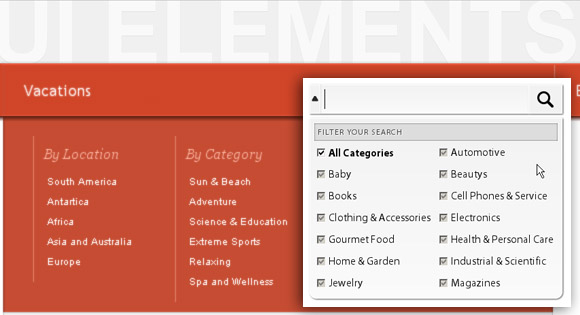
Today we will show you some more UI elements: a search box with a filter and a large drop down menu. We will use jQuery in both elements for the effect. We will also use plenty of CSS3 properties to create some slick looking details.
Search Box with Filter
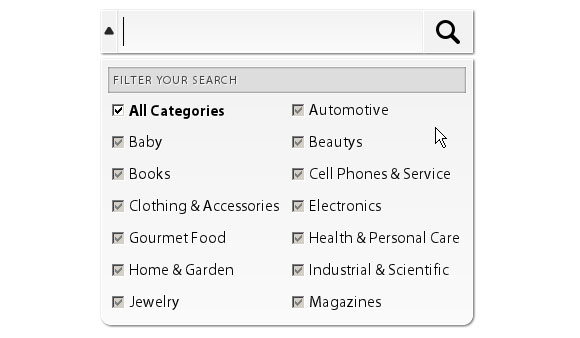
This search box reveals a drop down menu after the user clicks into the input field. The menu is meant to act as a filter with several checkbox options that allow the user to select specific categories for his search. When the user hovers out of the input or the filter box, the drop down will disappear.
Large Drop Down Menu
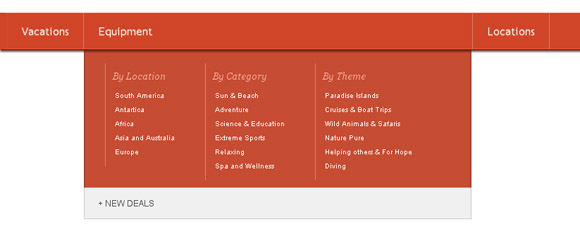
The large drop down menu is a good option for sites with a lot of navigation items. When the user hovers over one of the list items, the item enlarges to the width of the submenu and the submenu appears.





Hoooaaahhh… once again this is something I can immediately see a use for on my projects.
One thing that I think would be an improvement is if the up-or-down arrow was clickable. Confused me when I tried to open or close the filter menu using the arrow, finding it only opened when you click into the search box.
I did the same thing on my site, but with a few less options. I got my idea from the themeforest.net redesigned search.
The drop down menu is fantastic – I will have to spread the word to all those I know you love beautiful coded things 🙂
Yeep, I like your job …Mary Lou
always great and i waiting article and more ….
input have no ending tag />
thanks
I like the larger drop down menu too~
Loved the menu…
Nice !!!
It’s possible to add this with my favourite tutorial :
http://tympanus.net/codrops/2010/05/23/fresh-sliding-thumbnails-gallery-with-jquery-php/
cool and modern UI Elements, thanks
Again awesome tutorial..I will use this on my next wordpress theme..
Thank you very much for providing us a good tutorials..
In demo i’ve found two issues:
1. Text label of checkbox isn’t marked with tag
2. When checking checkbox, focus doesn’t return to input text field – it will be wery useful.
wow…uhuk uhuk
thanks ^^
may any want different color like
http://1.bp.blogspot.com/_ALuJjudg6Rg/TEBVyTvR-fI/AAAAAAAACVU/V2VPT5qJ59A/large-dropdown-menu.png
hihihihi…:D come to my blog LoL
Thank you so much for the post!I was looking for a good searchbox with filter for some time and this is just wha I need!!Great work!! 🙂
Awesome!!!
That menu is awesome!
You should really use labels with ‘for’ attribute for checkboxes. 🙂
Excellent work.
A full blown, db driven php and ajaxified search using the filters would be awesome.
Love your Stuff Mary
hi
very nice. can you help me to change this menu for right to left language?
please help me
thanks
i change it and work correctly for right to left language
Many thanks
#ldd_menu {
direction: rtl;
text-align: right;
}
ul.ldd_menu > li {
float: right;
position: relative;
}
Collapse div in ie 6 and change the order admin template & happy kingdom. Can’t show sidebar specially right side in ie 9.
try to reduce window size and see what would happen to the menu….
if you put a select element in the menu it will close the menu when you try and select an option.
Great job with this search widget – will definitely make use in future projects.
Great Job, i will use this in my next project!
cheers!
Hi,
The drop down menu is excelent! like the search box too! good job!
NOTE: for the search box, you forgot the ids on options of the select and the label click dont work 🙂
Thx to share your creations
Best regards
@alex.obukhov
To bring focus back to the input field after “mouseleave” insert the following just below the bind mouseleave function:
$(“input:visible:enabled:first”).focus();
Like this:
$ui.bind(‘mouseleave’,function(){
$(“input:visible:enabled:first”).focus();
$ui.find(‘.sb_up’)
.addClass(‘sb_down’)
.removeClass(‘sb_up’)
.andSelf()
.find(‘.sb_dropdown’)
.hide();
});
Where can we adjust the width of the drop down box?
Opps Found it in style.css.
thanks for this tutorial
Hi, great search box. How can I change the code to use radio buttons instead of checkboxes?
I changed the code to Automotive
Now it shows the radio button but you can select more than one radio button at a time which is not what I need.
I want to allow users to select one One category to filter the search by.
Any ideas?
Thanks
Hy, what is the license of your plugin? Can I use in my work, comercially??
Awesome
Superb Menu / Search panel !
Thanks keep it up !
How can I add a menu option that doesn’t expand? For example a home or link to one page that doesn’t have any menu options.
Thank you
How do I set the menu’s position to prevent menu overlapping when the browser window is sized small? Currently when you minimize the size of the browser window, the menu items get shifted around underneath each other. I know it has to do with the .css and position:absolute or position: relative, just can’t get the right code to work. Help! Please 🙂
hello … i added more categories … and when dropdown appears last item get on the left side above menu … i tried with overflow:hidde; but this will hide the dropdown … any ideas?
Hi, I found a little bug I think in IE 8: After i click inside the text field the dropdown appears then i take the mouse out and the dropdown dissapears. Now if i click on a different tab in IE 8 then click back on the tab with the search bar, the dropdown is shown and not hidden. It should be hidden until I click again in the text field.
solved it.
thanks very much.
I have everything installed nicely but I have a problem when I go to any of the menu and dropdown, the dropdown goes behind the posts, chat and everything near (below it) as the drop down hide behind any content I have below it
can you guys help me out on this to make the drop down on that menu to stay on top of everything?
When I changed the background colour of the dropdown menu from orange to light grey, there’s a light orange shadow on top on the menu. Is there anyway to get ride of that?