
From our sponsor: Leverage AI for dynamic, custom website builds with ease.
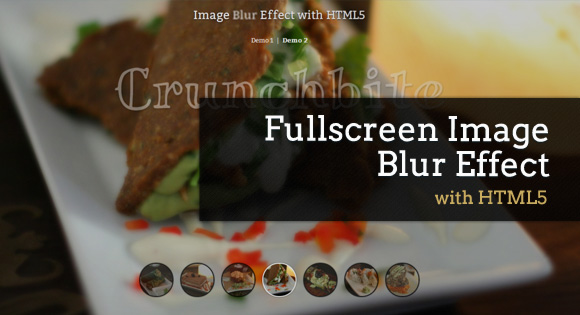
Today we want to share a neat image blur effect with you. Using canvas, we want to blur images on the transition to another one, creating a smooth effect.
We will be using Stack Blur, which is a fast, almost Gaussian blur for Canvas by Mario Klingemann from Quasimondo.
The images used in the demo are by Geoff Peters. They are licensed under the Attribution 2.0 Generic (CC BY 2.0) License.
How it works
The main idea is to add some images in our structure that will serve as background images. We will add the canvas element which will contain a blurred version of the image. When we navigate, we’ll add the blurred canvas behind the current image and fade the current image out. With the blurred canvas image now visible, we can either show the new image immediately (unblurred) or show it blurred and then “sharpen” it.
You can set that by changing the variation between 1 and 2:
animOptions = { speed : 700, variation : 1, blurFactor : 10 }
The speed is the animation speed between each transition (from normal to blurred) and the blurFactor is basically the radius for the blur effect used in Stack Blur.
Demos
- Demo 1: Here we use variation 2, showing the coming image without blurring it first.
- Demo 2: In this demo we use variation 1 for blurring both, the current image and the coming one.
We hope you liked our little experiment and find it inspiring and useful!


nice!
Looks great….!!
it would be very nice if you can provide jquery alternative of the same so that it will support in browsers in which html5 wont work….
WOW…amazing…zing…
and…delicious food…hmpft >_<'
Very nice
nice looking blur effect in HTML5
Nice effect, I really like it – but, by the way: Advertisement in demos is something new and disturbing in my opinion … 🙁
Thanks for all your feedback! Cheers, ML
Very nice! Reminds me of Gojee 🙂
Hi I am a professional photographer and was interested in the blur effect for a couple of ideas I have. Under Safari it looks more like a fade than a blur to sharp effect or am I missing something?
Is this compatible with all browsers?
Whoa! Stunning! Load time took a little long on my iPad, but it worked great.
Great!
Is there a way to make change automatically? like timed change??
Regards
Hey look, it’s something you can make in 2 minutes in flash. But this is innovative because… It’s not flash. It’s sad to see interactive design regress ten years
Thank you. Definitely worth the wait.
Thanks you friend. This is great!
Waouh! Great! Thank you son much.
Dear May Lou, one thing: how and where can we put more text. I mean not only titles of the images (ie: Flavour Bomb, Crunchbitesm etc) but some more text, under the titles with another style…
I guess it’s about the bx-container but not sure.
Thank you so much!
Why do I get an error: CANNOT ACCESS LOCAL IMAGE….?
Cannot access local image
As Davifdu says…
Please Mary Lou…
Could you tell us how to put more text, morever titles of the images (ie: Flavour Bomb, Crunchbitesm etc)?
It should be very nice from you.
Our best,
Jaime
Awesome script. I love it.
Can we use this effect on background images?
nice script but I get the same error… ‘cannot access local image’. What does this mean ?
“Cannot access local image” – you can’t run the script locally. You need to run in on a server env.
I get the message on firefox when I run the script from a server. I have to press OK like 14 times to access the site.
although the demo seems OK on codrops.
maybe I deleted something important ?
Javier: I was running the demo of this online when I get the error ‘cannot access local image’.
@CHACKMOOL I added a third demo with the autoplay slideshow.
@DAVDUF @Jaime you can insert your content inside the div with class “bx-content” .
Cheers, ML
Dear Mary Lou,
Thank you so much but what i should love to do is a diffrent text/content for each different… Background image, just like we can do the titles…
Thank you so much again!
My automatic slideshow is not working when i modified this a little is shows last image in the background. Please help
Great script! Just what I was looking for a project. But i tried to make it stop and I couldn’t.. it’s too complex for me. Even the variable BlurBGImage isn’t visible to console. Just needed to make it stop to save processing when showing processor-consuming things on top of background.. and maybe trigger the blurring when stopped.. can anyone help me with this?
thanks,
Alan
Hello,
Well, same as up; cannot access local image too, even on a server
http://catherinearnould.sio4.net/autres/test2.html
Mary Lou,
is there any way to add some indivdual html content for every image? If I add another .bx-content it is the same for all images. But I need separate content for every image.
Thanks!
Is Background images support this Effects.???
Not working in Firefox – “Cannot access local image”
Thanks for this great script! I love and I have been using it on my portfolio website. One thing though, I use the version with the slideshow function where it automatically displays the images. But I can’t figure out how to stop the slideshow as soon as I click on a button. Can somebody help me with this? Thanks!
Wonderful.
But, I encountered a problems.
I viewed the demo in Chrome and it behaved well.
I downloaded the file and then when I tried to access it with Chrome I got the answer “Cannot access local Image”.
I tried with FF and it behaved well.
Above a few commentators had mentioned they are experiencing issues in FF but in my case FF is behaving but Chrome is not.
I have the latest version of Chrome.
The utility is wonderful.
Thanks.
I was wondering how you would have different content appear for each page?
Hey Mary Lou
Thanks so much, for this creative solution.
I got just a little problem: In your demos as well, during the blurred transitions, a black box appears in the lower left corner. It depends on the viewport dimensions. Have you noticed this as well? Could you just give a quick hint, where this comes from? I can’t figure out, why this box appears.
Thank you very much.
Hi, ML! I’m doing an experimental page and I would love to do something with this effect. But all I want is to blur on hover and not change the image. I’ve managed to trigger on hover, but stop the animation on the blur was too much for me. Can you enlighten me on that one?
Although it could be my monitor, but the background/blurring gives a fantastic impression of a special kind of plastic surface I’ve seen somewhere. Dunno if anyone can see it this way, but think about a photo printed on a rough or densly striped plastic surface. Very nice this.