
From our sponsor: Leverage AI for dynamic, custom website builds with ease.
Here is a very simple and cool registration form. A lot of times I was searching for some registration or login form that is easy to adapt. Here comes my contribution to the community. I hope you can use it!
The result looks like this:
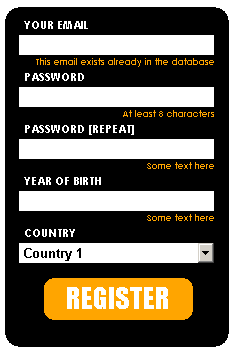
Let’s start with the css. Add it to your header or to your existing style:
<style>

.registration form{
 width:220px;
 height:330px;
 background-color: black;
 padding: 10px 0px 0px 4px;
 -moz-border-radius: 15px;
 -webkit-border-radius: 15px;
 color: white;
 text-transform: uppercase;
 font-size: 11px;
 font-weight: bold;
 font-family: "Century Gothic";
}

.registration input, .registration select{
 width: 195px;
 height: 20px;
 margin: 3px 0px 0px 10px;
 border: 0px;
 font-weight: bold;
}

.registration input:focus{
 background-color: orange;
}

.registration form label{
 margin: 5px 0px 0px 15px;
}

a{
 outline:none;
}

.register_button{
 width: 149px;
 height: 42px;
 background-color: orange;
 -moz-border-radius: 10px;
 -webkit-border-radius: 10px;
 margin: 15px auto 0px auto;
 text-align: center;
 cursor: pointer;
 clear: both;
}

.register_button span{
 font-weight: normal;
 font-size: 28px;
 font-family: "Impact";
 line-height: 40px;
}
.register_button span a{
 text-decoration: none;
 color: white;
}
.register_button span a:hover{
 color: black;
}

span.error{
 margin-right: 20px;
 font-size: 9px;
 color: orange;
 height: 10px;
}

p.error{
 margin:0px 14px 0px 10px;
 font-size:9px;
 color:orange;
 height:6px;
 padding: 0px 0px 8px 0px;
 text-align:right;
 text-transform:none;
}

</style>
The html will be a form inside of a div with the class “registration”:
<div class="registration">
 <form>
 <label>Your email</label>
 <input type="text" />
 <p class="error"><span>This email exists already in the database</span></p>

 <label>Password</label>
 <input type="text" />
 <p class="error"><span>At least 8 characters</span></p>

 <label>Password [repeat]</label>
 <input type="text" />
 <p class="error"><span>Some text here</span></p>

 <label>Year of Birth</label>
 <input type="text" />
 <p class="error"><span>Some text here</span></p>

 <label>Country</label>
 <select name="country">
 <option>Country 1</option>
 <option>Country 2</option>
 </select>

 <div class="register_button"><span><a href="#">REGISTER</a></span></div>

 </form>
</div>
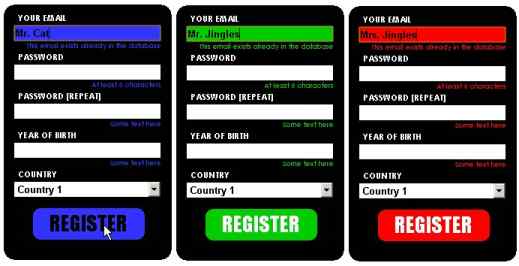
You can adapt the color as you like, since everything looks fine with the black. Just change the three “oranges” in the class p.error, register_button and .registration input:focus.
Here are some examples:
Enjoy!





Doing some web surfing and noticed your website appears a bit messed up in my K-meleon internet browser. But fortunately hardly anyone uses it anymore but you may want to look into it.
I couldn’t resist commenting. 🙂