
From our sponsor: Leverage AI for dynamic, custom website builds with ease.
This is an example of a very simple CSS + one tiny image chart. The result will look like this:
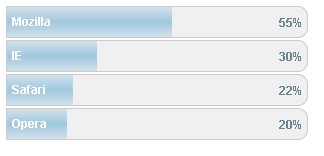
Insert the follwoing style into the head of your html (or add it to your existing CSS):
<style>

.container{
 width:300px;
 font-family: Arial;
 }

.record{
 float: left;
 width: 100%;
 border: 1px solid #ccc;
 background-color: #f0f0f0;
 margin-bottom: 2px;
 -moz-border-radius: 0px 10px 10px 0px;
 -moz-border-radius: 0px 10px 10px 0px;
 }

.bar {
 background: transparent url(gradient.png) repeat-x top left;
 float: left;
 clear: left;
 height: 30px;
 }

.bar span{
 font-size: 12px;
 font-weight: bold;
 color: #fff;
 float: left;
 margin-left: 5px;
 margin-top: 7px;
 }

.p{
 padding-top: 3px;
 float: right;
 color: #6D8591;
 clear: right;
 font-size: 12px;
 font-weight: bold;
 height: 25px;
 }

.p span{
 font-size: 12px;
 font-weight: bold;
 float: left;
 margin-right: 5px;
 margin-top: 5px;
 }

</style>
First, we create a container that will hold all the chart with its records. The width of that can be adapted to your needs as we will define the width of each record as a percentage. You can use this very nicely if you have some kind of dynamic content:
<div class="container">
 <div class="record"><div class="bar" style="width:55%;"><span>Mozilla</span></div><div class="p"><span>55%</span></div></div>
 <div class="record"><div class="bar" style="width:30%;"><span>IE</span></div><div class="p"><span>30%</span></div></div>
 <div class="record"><div class="bar" style="width:22%;"><span>Safari</span></div><div class="p"><span>22%</span></div></div>
 <div class="record"><div class="bar" style="width:20%;"><span>Opera</span></div><div class="p"><span>20%</span></div></div>
</div>
The image of the gradient is the following:

Unfortunately, the rounded borders don’t work in IE, but anyway, it also looks nice without 🙂





Pingback: Simple css chart for dynamic content
i think we need another gradient graphic.
-webkit-border-radius: 0px 10px 10px 0px;
-webkit-border-radius: 0px 10px 10px 0px;
Bad that Cyrillic is not supported ?
When one of charts goes to 90% or above, it breaks in half.
solution: add some css
.record
{ …
position: relative;
.. }
.p
{…
position: absolute;
right: 0;
…}