
From our sponsor: Leverage AI for dynamic, custom website builds with ease.
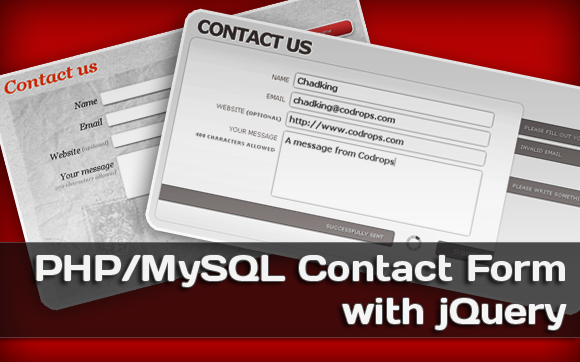
Here’s an implementation of a contact form with PHP and jQuery. Usually, one would only want the message posted by the user to be sent to an email address. This script does that and also saves all these messages in the database for the admin to keep track of them.
The table to store this data is the following:
CREATE TABLE CONTACT(
pk_contact 	INT UNSIGNED NOT NULL auto_increment,
name			VARCHAR(120) NOT NULL,
email 			VARCHAR(120) NOT NULL,
website		VARCHAR(120) NOT NULL DEFAULT "",
message		VARCHAR(300) NOT NULL,
added_date 	TIMESTAMP NOT NULL DEFAULT CURRENT_TIMESTAMP,
primary key(pk_contact)
)type=innodb DEFAULT CHARACTER SET utf8	COLLATE utf8_general_ci;
We will keep track of the name, email, website (optional), the message, and the date when the message was sent. Feel free to change the limits of the fields, but don’t forget to change them as well in the PHP files.
We use jQuery for the front end, and AJAX for submitting the form. All the validations are done on the server side, and the user will be notified when one of the fields is not correct. If the message is inserted into the database, an email is sent to the admin, notifying him about a new message.
We provide two CSS templates for the contact form.
Concerning the installation, all you need to do is run the database script (db_main_script.sql) and configure your database connection in config.php:
define('DB_SERVER', 'localhost');
define('DB_USER', 'root');
define('DB_PASS', '');
define('DB_NAME', 'ContactForm');
You can also configure the email parameters in this file, like the Email Message Subject.




This isn’t a bad tutorial, but it could have been better. The main thing I would suggest is to use PHPMailer with support for SMTP. Since most shared servers will have mail() either shut down entirely or require it to be sent via SMTP.
Also, using a different MySQL class something like ezsql. Or even use MDB2 from PEAR (but though some shared hosts don’t have PEAR installed).
It’s a good article, and for the ones looking for a intro into forms and such then it’s a good move. We use CakePHP at http://theeasyapi.com which includes exceptional lightweight API access.
Nice work though
Useful and simple. Thanks for sharing
Nice tutorial, easy to follow, thanks.
Thanks for this tutorial, very nice
i don’t see the tutorial but any the demo is beautiful will study the download source thanks
Thanks it’s looks very nice
esta muy bueno.. graciass
thanks nice Contact Form
I got an issue with the form.
I tried to embed it into my MVC-Framework and it doesn’t work anymore.
I click on the submit button and get the loader image, but nothing happens next.
i read all the files and nothing seems to have a wrong link to a resource file.
ThankS Nice Contact Form
DankeSchon : )
This also needs to validate whats with the input and others inside a p tag???
PHPmailer is easy to implement but the validation makes it look like a hack.
wow,, cool contact form, i need it.. thx for the tutorial
after downloading this site and configuring .. its not working anymore ..can somebody help me please
I think the index1 style looks horrible, however the code behind this app is sweet, very easy to modify.. thanks! 🙂
is there a way to get an error message to echo out on the form page if the submission doesn’t work? I assume there is. I am submitting in my local try-out and just getting the spinning wheel. Probably an issue with connecting to the DB, but an error msg. would let me know for sure.
hello, Firstly thanks for sharing. this stuff is great. but I have a problem.
I’m a turkish. characters set is problem. how can I fix it… ?
example:
http://img560.imageshack.us/i/11732151.jpg/
Does any one know how to change the submission confirmation from a one line that appears below the form to a separate confirmation page? Also, I need to create an interim page that displays the user’s information for their confirmation before they submit. Any ideas?
Very beautiful and original form! Thank you for the fact that we have the opportunity to come to you and learn a lot! Thank you again!
it doesn’t send any email…?
i have an apache server in my room, what can i do?
thank’s
I noticed that if you enlarge the textfield in the demo; the items get out of place and the image does’nt grow with it.
just a tip.
Great contact form, i have problem with this script the successful message not shown and emails didn’t inserted to db and not sent, it’s was work fine with me but after i changed my hosting company this issue happen and seem the script not working because some php and sql codes if any one could help to fix this issue or use script without insert email to database.
thank you
any one can help me to find the php feature which is effect this script working. i think some thing is disabled on my server which is make script not work fine, any one know which feature is that.
I have set it up perfect. But when you fill in the form and click send you dont get a email.. Can you please help?
Hi, nice form, however, I can’t seem to get it working. It looks great but when I send something, all it does is loop around and around. I know some people here have pointed that out but unfortunately nobody wants to answer the question. What good is a comments section if no one uses it. Thanks
tried and tried and never could get it to work, it seemed cool, but it never work, don’t know what I did wrong.
send message in mysql table for gmail ?
nice tutorial
can u pls provide a version without MySQL i.e. only for sending mail wout save
I tried, tried hard.. but its just not sending, nor does it give error, on clicking submit all it does is tht is shows the loader, please helppppppp….
@Madhuri Which link should we look at?